My ‘job’ isn’t really one, I don’t make sufficient money to make it worthwhile so I guess it’s more like a hobby. But as digital technology has improved I have been able to include it more into my art and mark making.
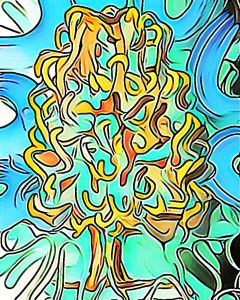
This image started as a digital drawing in Artrage. I then ran it through filters on the photodirector app several times which came up with this image of a tree. I like being free to experiment with art and seeing what results.
Take an image, duplicate it, turn it until you are happy with it’s position. I used incollage app to create these. The original images can be a drawing, an image that has been digitally manipulated or just a photo of an object. Just experimenting and having fun.
Digital art memory from 2 October 2016. I have no memory of how I did this. I think I used a free app called Artrage oils. And I must have used the old layout app, but I don’t know how I achieved the different colours. Anyway it’s definitely a piece of my digital art. 7 years ago.
Exercise in perspective. Digitally manipulated photo of a door and window. It’s created an apparent corner where non exists. I tried rotating the image four times until I was satisfied with this picture. I used the incollage app to do it, I was previously using the old Instagram layout app.
I was trying to draw the planet Saturn, which is at opposition at the moment (on the far side of the sun so fully illuminated). But I couldn’t get the right shape or colour so I went a bit abstract. Using Artrage and photodirector I put the initial sketch through lots of filters and ended up with this colourful picture.
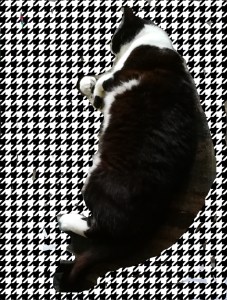
I tried to add a pattern underneath my kitty because he carpet he is lying on was dark and you couldn’t make out the outline easily. But I couldn’t finger paint around the cat very easily. Still I did an OK job. I wanted to add a black and white pattern to this photo of one of my black and white cats.
I love cats , they can be good companions and they are not as aloof as they are sometimes portrayed. I used Houndstooth check which seemed like a good choice. I should really try doing this in photoshop but I’m too tired to fire up my PC.
Playing and learning, using metallic felt pens and the filters and mosaic tool on my phone.. It’s the sort of thing you might call a doodle or an illustration. But is it art? I could imagine using these images for cards or for a children’s book. The cat is titled “tortie”. Not much more I can say.
I am feeling a bit uncreative so I decided to collage my horse drawing from a few days ago. If you can create digitally it allows you the freedom to make something new.
Recently a photographer entered a competition with a piece called something like ‘the electrician’? It was a black and white photo of two women, one behind the other, one had hands on the others shoulders. The photo looked old fashioned and a little bit weird. The photographer refused the prize because the image had been created by an AI, the faces were not real people but had been built up from features by the AI a bit like an identikit photo. It’s called machine learning.
On a similar vein an image of ex president Trump appeared recently apparently marching at the head of a massive crowd of people in New York but if you zoom in the people behind are ‘constructed’ by an AI and their faces are very distorted.
What I’m trying to say is that digital art created by humans is not the same as AI. The difference is hard to pin down. But if a person has control of it does that count as art. I’m sure there is much controversy to come? In the meantime I will continue to digitally draw and manipulate with human control.
An Easter symbol, digitally manipulated. Today is Christian Good Friday when Jesus was crucified. I thought I would try creating something that looked slightly baroque but combined with a simple brown cross shape. I added light on the final panel. I’m not religious, but at this time of year the symbology and ideas of peace and love stick with me. I hope this is OK and does not cause offence.
When you get new apps you have to learn how to use them. There are similarities and differences. You try one app and then transport an image into another app and try and alter it by using different filters and pens and markers. Each of these started with the bottom left sketch and then I took a screenshot of it ( I had to find out how on this new phone), then added more on top. It’s not going to be my favourite method of altering images, but I’m learning. I have found recently that drawing tools seem to be limited. Instead you get backgrounds and filters to alter faces and landscapes but using photoshop like tools, not paintbrushes or pens. I know I can do more if I had the tools. Perhaps I will find something more satisfying soon.





 Mallaband-Brown